How to Claim Business on ChatGPT: Step-by-Step Guide
If you want to claim business on ChatGPT, open ChatGPT Business Hub, search for your company, select the correct listing, and verify that you own or represent it. OpenAI may offer verification through a business phone, business email, website domain, or Shopify. After claim approval, you must complete Persona identity verification before you can publish profile changes, access insights, or receive the verified badge.
OpenAI launched Businesses in ChatGPT in beta on November 10, 2026. In India, access depends on business type, location, supported verification, and OpenAI’s checks. Eligible online businesses may be able to claim or add a profile, while local-store and restaurant claiming is more limited.
What Does It Mean to Claim a Business on ChatGPT?
Claiming gives an authorised owner or representative a management path for an existing ChatGPT business listing. It does not guarantee rankings, recommendations, traffic, or sales.
A claimed ChatGPT business profile can be managed through Business Hub after the required checks are complete. OpenAI says verified businesses can update approved information and access engagement insights such as mentions and website clicks.
There are two separate checks:
- Claim verification proves your connection to the company.
- Persona identity verification confirms the person managing it.
Passing the first step does not automatically give you the blue verification check or full profile controls.
Who Can Claim Business on ChatGPT in India?
Indian businesses can try Business Hub, where ChatGPT is available and the required verification path is supported, but eligibility is not automatic.
OpenAI says an owner or authorised representative can claim an eligible profile. Availability can vary by industry, location, business type, verification support, and integrity checks.
Eligible online businesses with a website may get a claim or create option. OpenAI currently says local stores and restaurants can claim only existing U.S. listings, so some Indian local businesses may instead see a waitlist or no claim path.
Business Agents are separate and currently limited to eligible U.S. ecommerce and online-service businesses.
For the latest eligibility rules, refer to OpenAI’s official Businesses in ChatGPT information. OpenAI: Businesses in ChatGPT
How to Claim Your Business on ChatGPT: 9 Simple Steps
If your business already appears in ChatGPT Business Hub, you can claim the existing listing instead of creating a new one. Understanding how to claim your business on ChatGPT helps you verify ownership, manage your business information, and access available profile features. Follow these seven steps to claim your existing ChatGPT business listing.
If your business is not listed yet, see Digirank’s guide on how to register your business on ChatGPT. This article focuses specifically on claiming an existing listing.
1. Find Your Business Profile
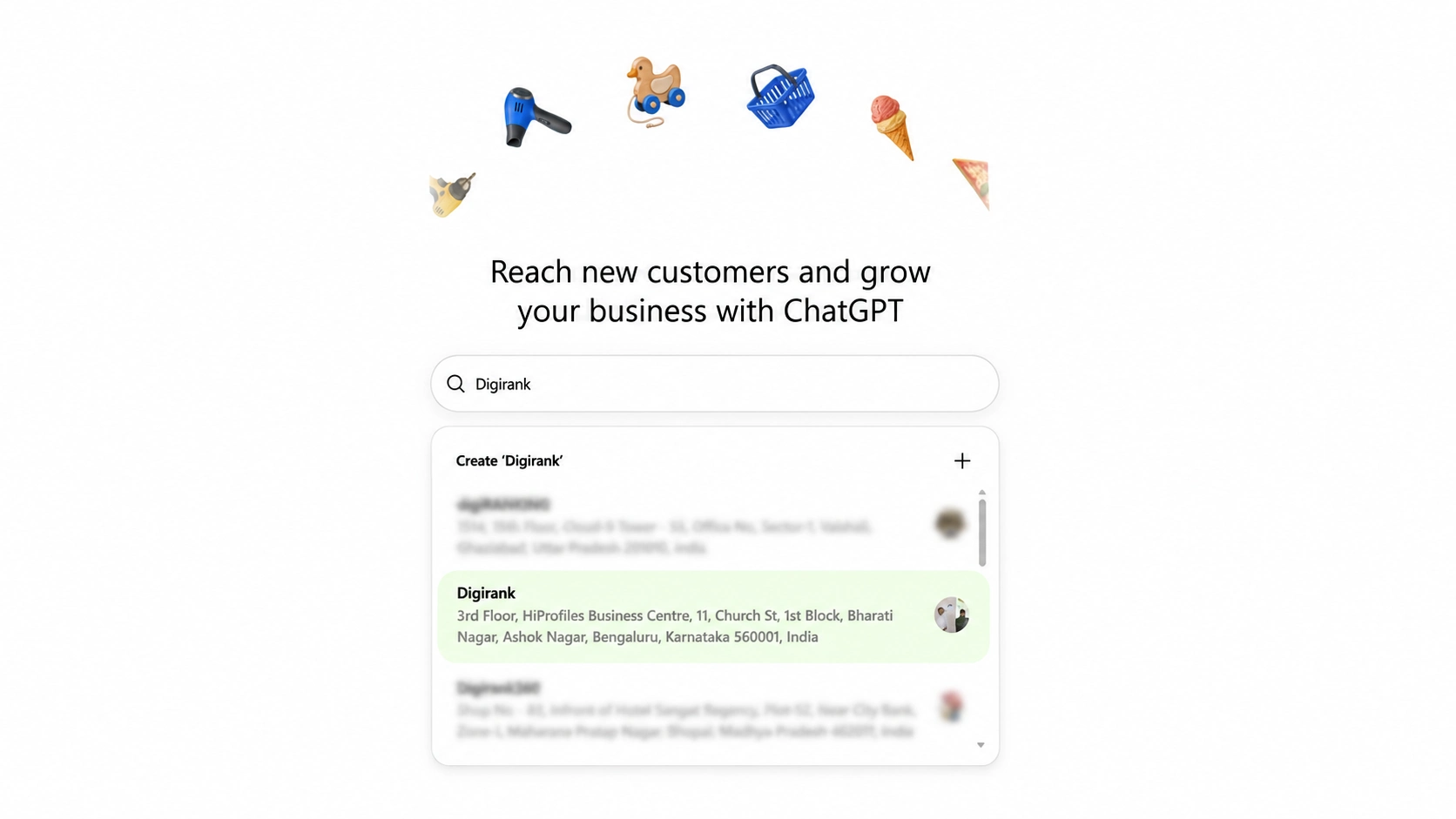
Open ChatGPT Business Hub and search for your business name. If your business appears in the results, select the correct listing to begin the claiming process.
2. Click Get Started to Claim Your Business
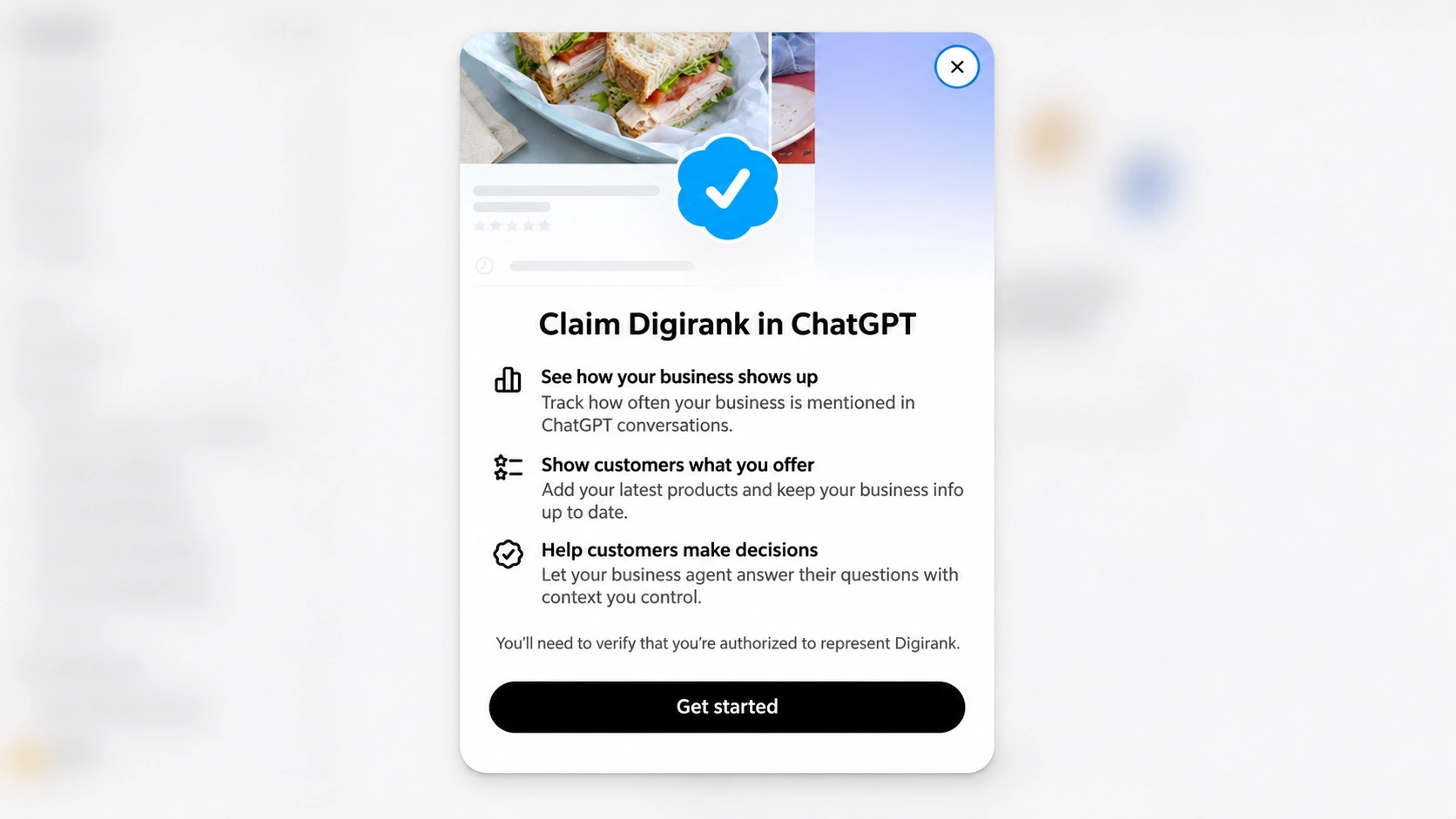
Once you select your business, ChatGPT displays a claim window explaining the benefits of managing your ChatGPT business profile. Click Get started to proceed with the claim.
3. Confirm Your ChatGPT Account
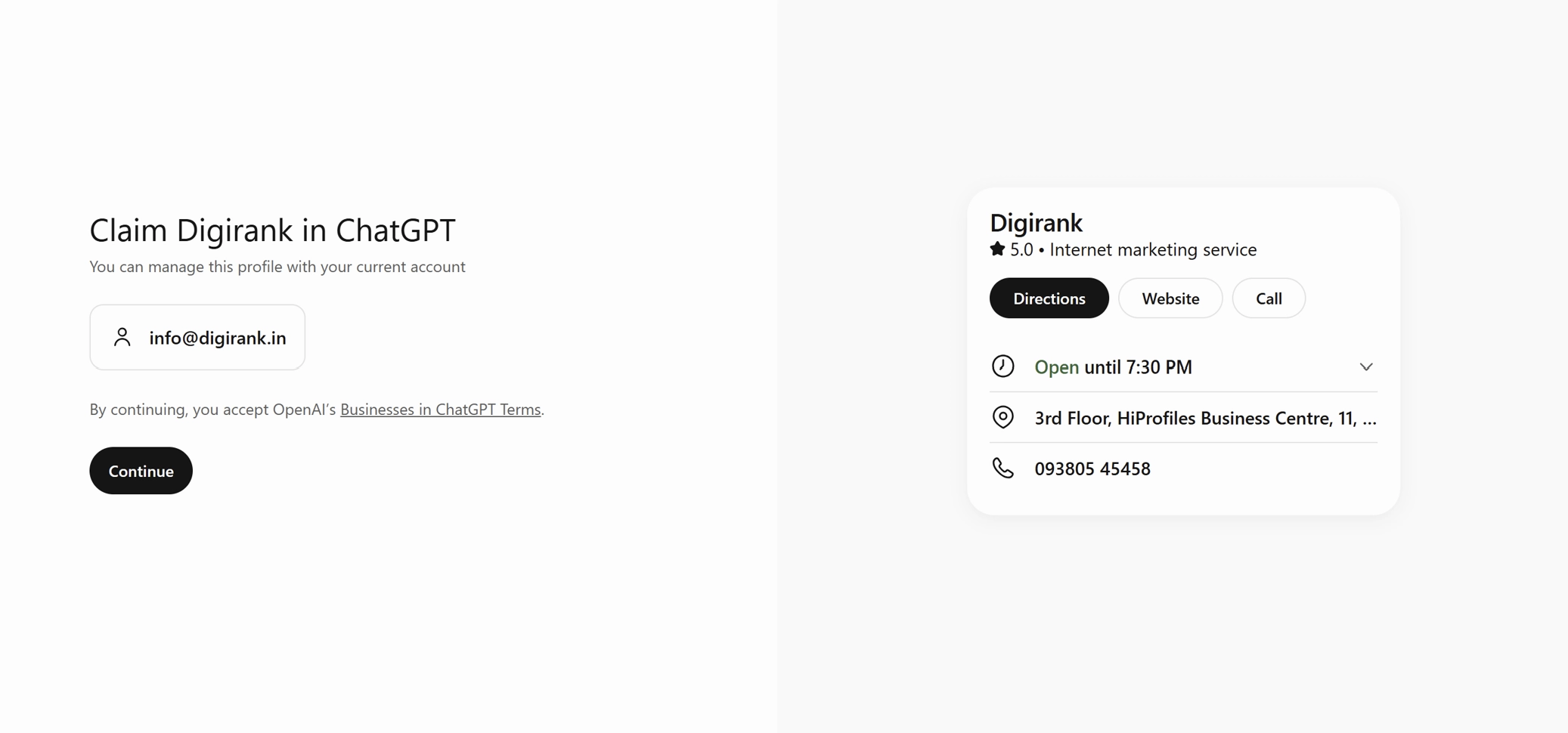
ChatGPT displays the account that will manage your business listing. Check that the correct account is selected, review the business details, and click Continue to proceed.
4. Choose Your Business Verification Method
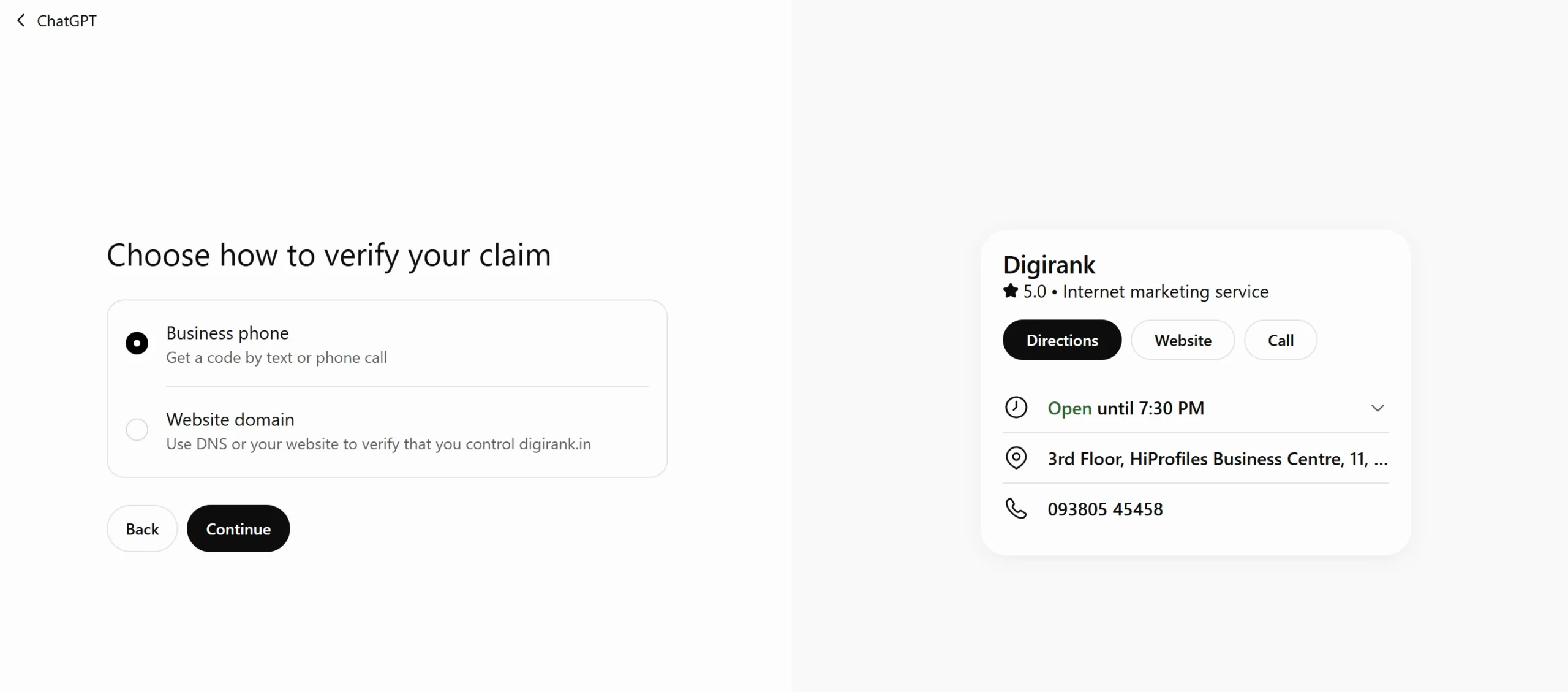
ChatGPT provides available Business Hub verification options to confirm your connection to the company. As shown in the screenshot, you can choose Business phone or Website domain. Select your preferred method and click Continue.
5. Verify Your Business Through Phone Number
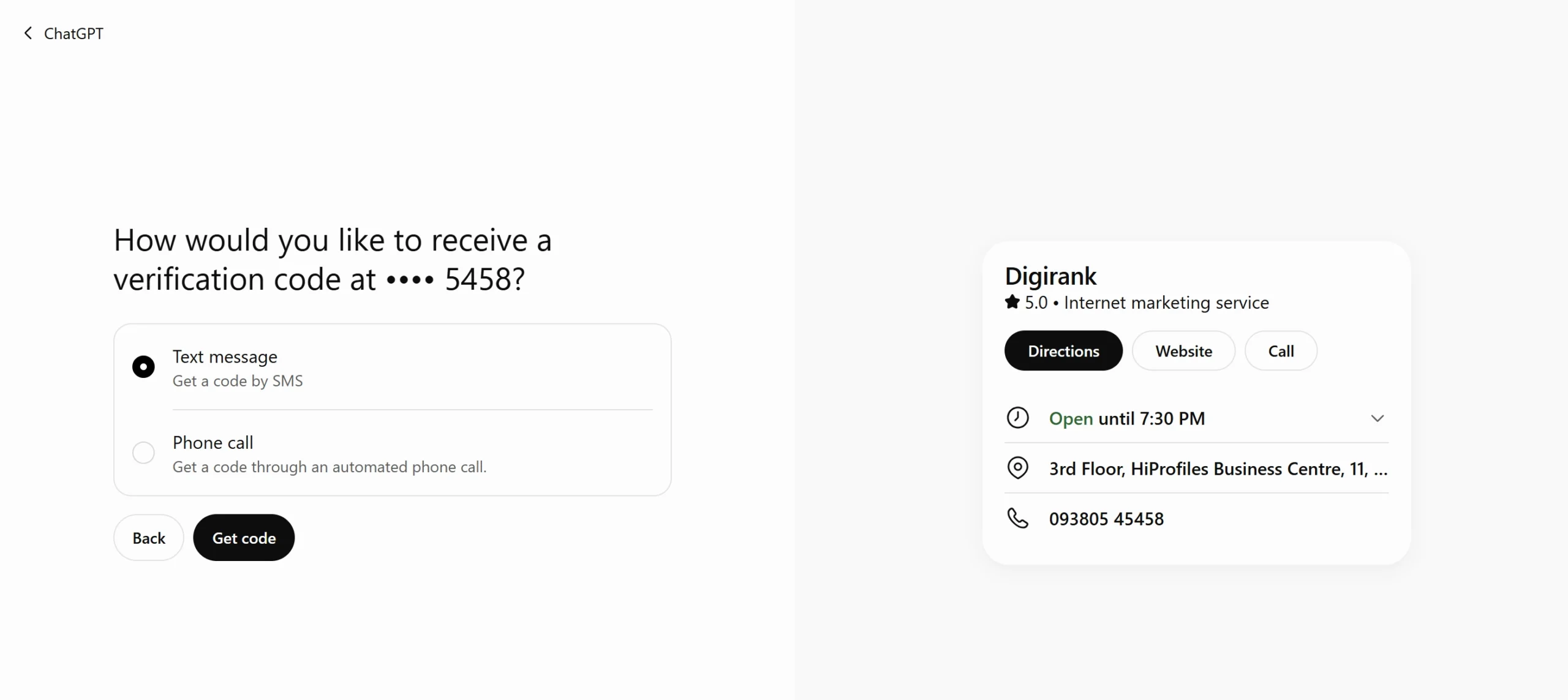
If you select Business phone, ChatGPT offers verification through a text message or phone call. Follow the instructions and enter the verification code you receive to confirm your connection to the business.
6. Verify Your Business Through DNS
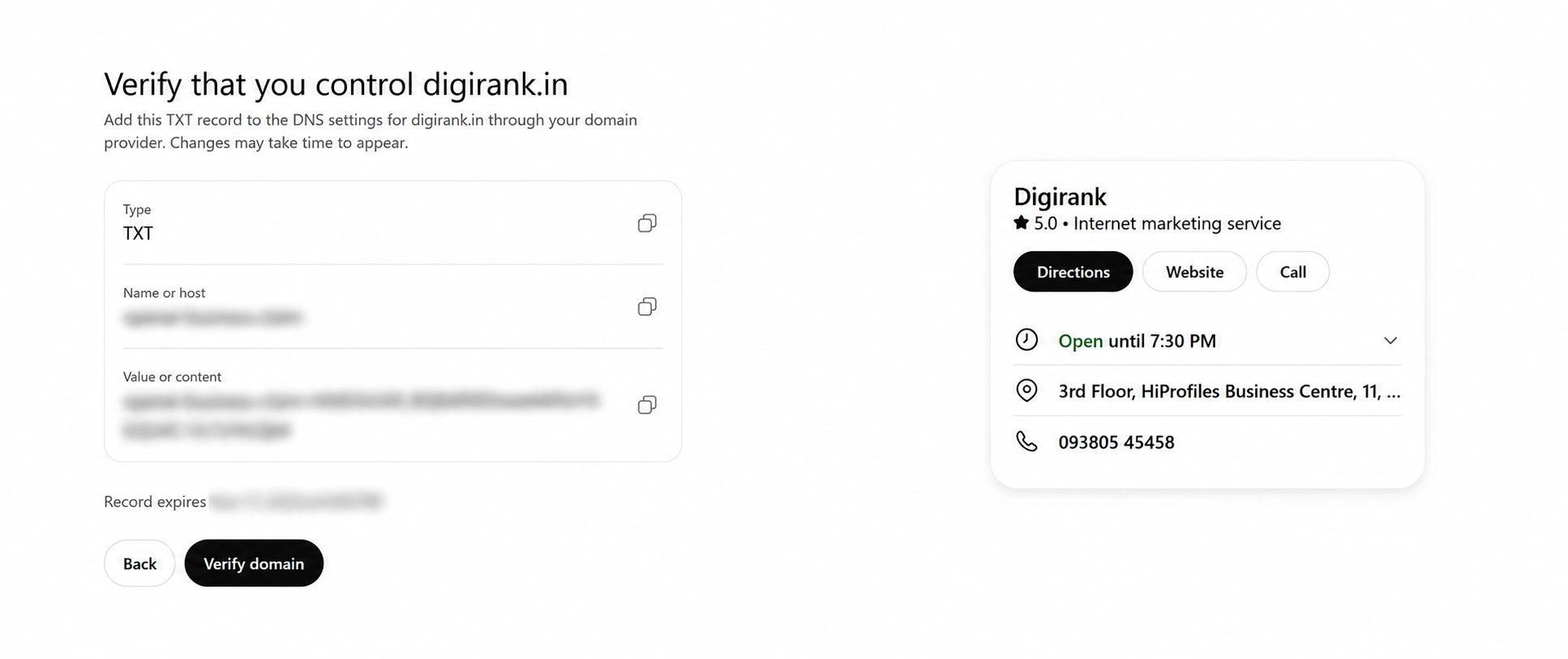
If you select Website domain, ChatGPT provides a DNS TXT record to verify domain ownership. Log in to your domain provider, open DNS settings, and add the provided record details. Save your changes, return to ChatGPT Business Hub, and click Verify domain.
7. Wait for OpenAI to Review Your Business Claim
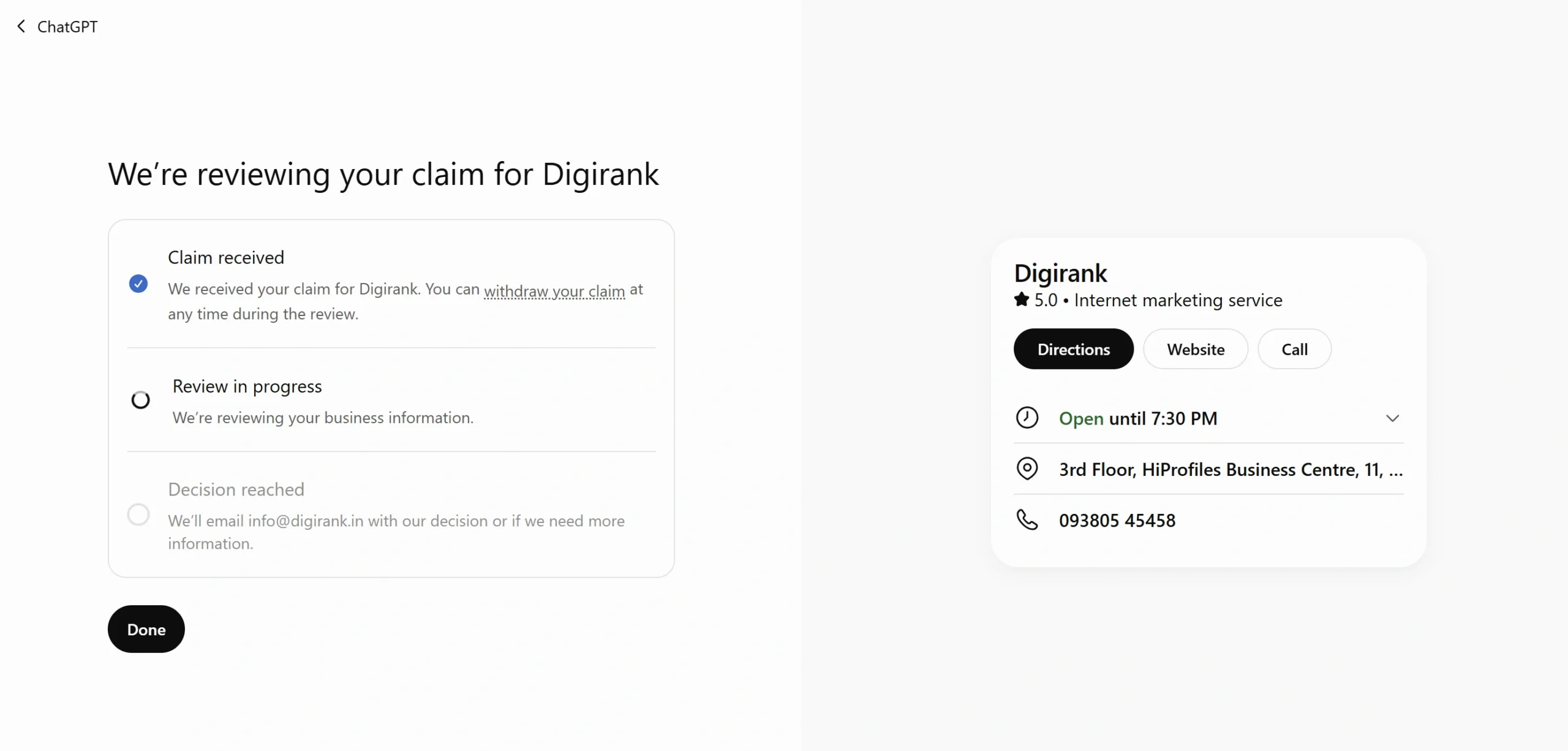
After submitting your verification, ChatGPT displays a claim review status page. You can track the progress of your ChatGPT business listing through three stages:
• Claim received: OpenAI has received your business claim.
• Review in progress: Your business information is being reviewed.
• Decision reached: OpenAI will email its decision or request additional information.
Click Done after submitting your claim.
8. Complete Identity Verification in ChatGPT Business Hub
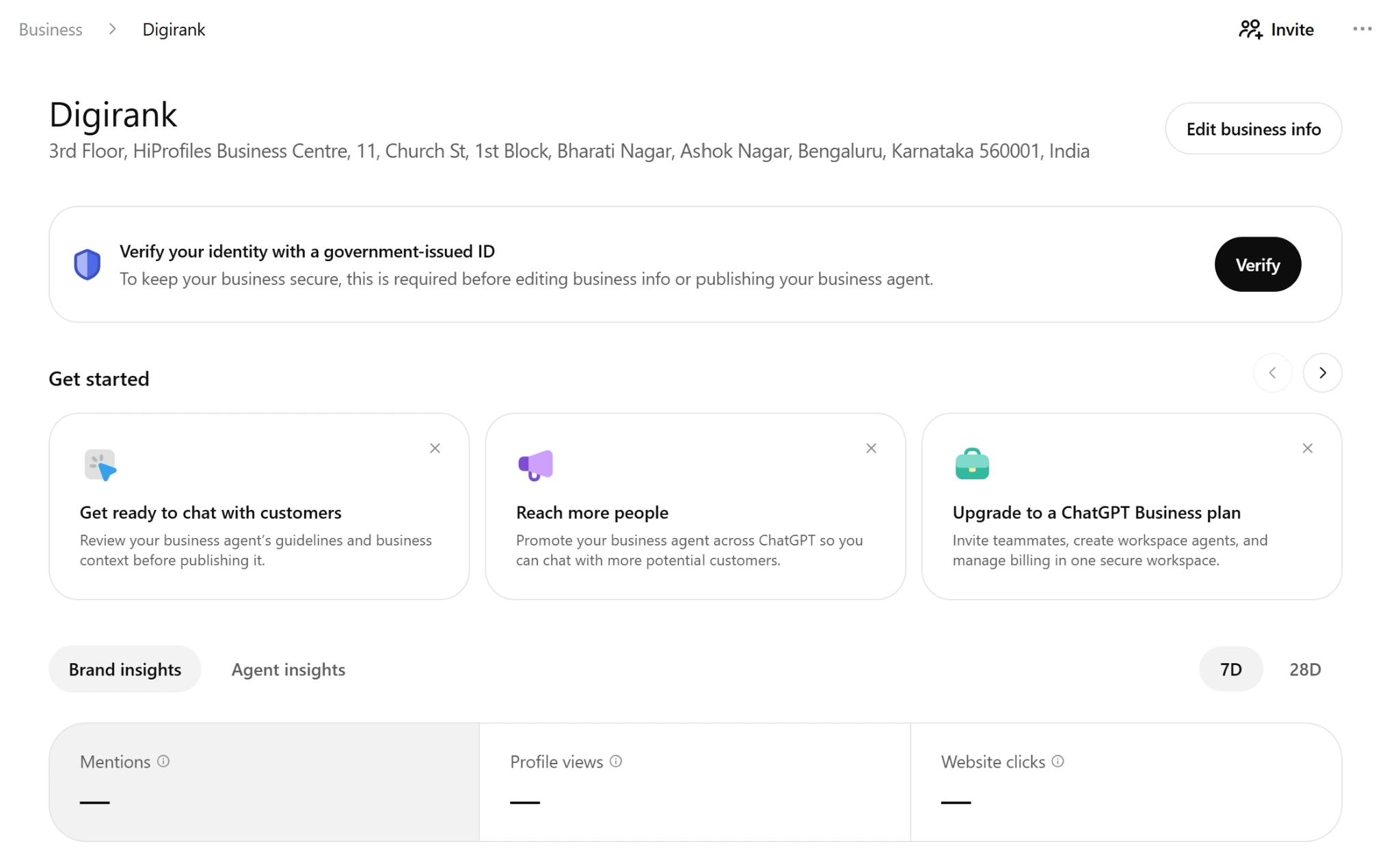
After your business claim is approved, open your ChatGPT business profile in Business Hub. Click Verify under the Verify your identity with a government-issued ID section and follow the instructions to complete identity verification. This step is required before you can edit your business information or publish a business agent.
9. Manage and Update Your ChatGPT Business Profile
Once your government-issued ID verification is approved, you can access the available management features in ChatGPT Business Hub. Click Edit business info to update your business details, review your profile information, and make necessary changes. You can also explore Brand insights to monitor business mentions, profile views, and website clicks as data becomes available.
What If Someone Else Has Already Claimed Your Listing?
If another person controls your profile, use the ownership dispute process instead of creating a duplicate listing.
OpenAI says you can open the profile, use the more-options menu, and select Dispute ownership. Follow the prompts to prove that you are authorised to represent the business.
This is useful when a former employee, agency, franchise partner, or consultant previously managed the account.
What Should You Update After Verification?
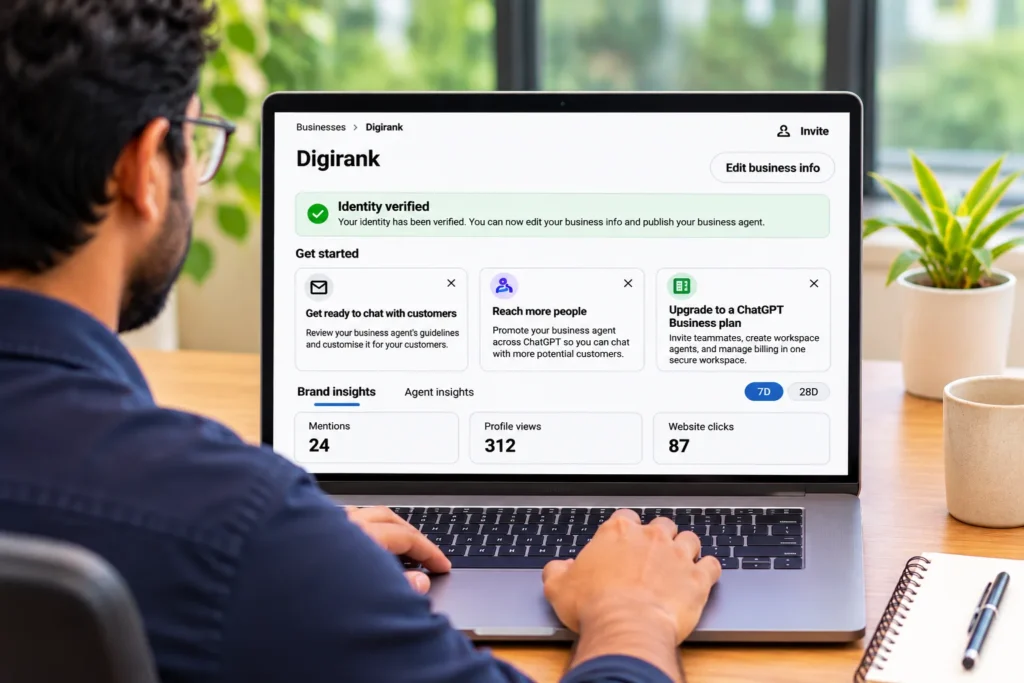
Once verified, focus on accurate business information rather than stuffing your profile with SEO keywords.
Review your business name, website, description, category, logo, contact details, and available product or policy information. Your ChatGPT business profile should match the core facts on your website.
Your website should also explain what you do, who you serve, your key services, locations, policies, proof, and common customer questions. OpenAI can use information from other sources, so Business Hub should support your broader SEO and entity strategy rather than replace it.
If you want stronger Google and AI visibility, Digirank’s SEO services in Bangalore combine SEO, AEO, GEO, local search, and AI-search optimisation.
Does a ChatGPT Business Listing Improve Rankings?
No. Claiming a ChatGPT business listing does not guarantee that ChatGPT will mention, rank, or recommend your company more often.
OpenAI says Business Hub does not promise placement, visibility, traffic, conversions, or sales. ChatGPT continues to make independent recommendations.
The real value is accuracy and control. A verified profile gives your business a way to maintain current first-party information when it appears.
Your website still matters. OpenAI says OAI-SearchBot is used for ChatGPT search and recommends allowing it if you want eligible pages to appear. Crawl access does not guarantee citations, but blocking the crawler can reduce search eligibility.
Webmasters can review OpenAI’s crawler controls before making robots.txt changes. OpenAI Crawler Documentation
What Can You Measure Inside Business Hub?
After verification, Business Hub can provide aggregated insights that show how people interact with your business in ChatGPT.
Metrics can include mentions, website clicks, and discovery topics. They do not reveal every user prompt, competitor, or reason ChatGPT selected one source over another.
Use these insights with GA4, Search Console, lead tracking, and CRM data. A mention shows awareness. A click shows interest. A qualified enquiry or sale shows business impact.
Digirank Take: Treat Business Hub as Entity Infrastructure
At Digirank, we see Business Hub as a business-identity layer, not a shortcut to AI rankings.
The bigger opportunity is to keep company information consistent across your website, structured data, trusted profiles, and other credible sources. Then publish pages that answer real customer questions with clear facts, proof, and useful context.
That gives search engines and AI platforms a stronger understanding of who you are, what you offer, and when your business may be relevant.
For measurable growth, Digirank can help improve search visibility, attract qualified leads, and turn AI discovery into conversions with a strategy focused on ROI.\
Frequently Asked Questions About ChatGPT Business Listings
If you’re planning to claim business on ChatGPT, these frequently asked questions explain eligibility, Business Hub verification, profile management, and how business listings work in ChatGPT.
1. Can Indian businesses claim a business on ChatGPT?
Eligible Indian online businesses may be able to claim or add a profile if ChatGPT Business Hub supports their verification method. Availability depends on business type, location, and eligibility requirements.
2. Is ChatGPT Business Hub free?
Yes, claiming an eligible business profile is currently free. You do not need a ChatGPT Business subscription, Ads account, or Enterprise plan to submit a business claim.
3. How do I verify a ChatGPT business profile?
You can complete Business Hub verification using an available method, such as a business phone, email, website domain, or Shopify. After claim approval, you must complete identity verification to access additional profile management features.
4. How long does Business Hub verification take?
OpenAI does not specify a fixed timeline for business claim approval. The process may vary depending on the verification method, claim review, and additional identity checks.
5. Does claiming my business make ChatGPT recommend it more?
No. Claiming your business does not guarantee higher visibility or recommendations in ChatGPT. However, it allows you to manage verified business information and review available performance insights.
6. What if my ChatGPT business listing is already claimed?
If someone else has claimed your business listing, open the profile, select the more-options menu, and choose Dispute ownership. Follow the instructions to verify your connection to the business.
7. Can my business appear in ChatGPT without being claimed?
Yes. Businesses can appear in ChatGPT even without a claimed profile. Claiming an eligible listing allows authorised representatives to manage business information after completing the required verification.
8. Is ChatGPT Business Hub the same as ChatGPT Business?
No. ChatGPT Business Hub helps businesses claim, verify, and manage their profiles in ChatGPT. ChatGPT Business is a separate paid workspace designed for teams and organisations.
Need help applying this?
Turn the Insight Into a Clear Growth Priority
Bring us the channel decision, visibility challenge or website question you are working through. We will help you identify the most useful next step.