

Robots.txt and Sitemap.xml: Complete SEO Guide
Robots.txt controls which parts of a website search engine bots may crawl. An XML sitemap lists the important, canonical URLs you want search engines to discover. Used together, robots.txt and Sitemap.xml help Google avoid low-value URLs and find useful pages more efficiently.
They do not guarantee rankings or indexing. A sitemap supports discovery, while robots.txt controls crawling. Never use robots.txt as a privacy tool. A blocked URL may still appear in search if other pages link to it. Use noindex or password protection when content must stay out of Google.
For founders and marketing teams, these files form a basic part of technical SEO. A clean setup improves crawlability, site maintenance, and troubleshooting.
Robots.txt vs XML Sitemap: What Is the Difference?

Robots.txt manages crawler access, while an XML sitemap provides a structured list of preferred pages, images, videos, or other files for discovery.
|
File |
Main purpose |
Common location |
Cannot do |
|---|---|---|---|
|
robots.txt |
Allows or blocks crawling |
domain.com/robots.txt |
Reliably remove a page from search |
|
Sitemap.xml |
Lists canonical, indexable URLs |
domain.com/sitemap.xml |
Force crawling, indexing, or ranking |
Think of robots.txt as a gate controller and the XML sitemap as a route map. One controls entry; the other highlights destinations worth checking.
A page should usually not be blocked in robots.txt and listed in the sitemap together. That sends conflicting signals.
What Is Robots.txt and how Robots.txt Works

A robots.txt file is a public text file at the root of a host that gives crawl instructions to compliant search engine bots.
Before crawling, a bot such as Googlebot checks robots.txt. It reads rules grouped by User-agent, then applies matching Allow and Disallow paths. Google confirms in its official robots.txt guidance that these rules manage crawling, not confidentiality or guaranteed removal from search.
When explaining what is Robots.txt, this example shows how compliant bots are asked to avoid admin and checkout areas while still accessing the rest of the website. The final line points crawlers to the XML sitemap.
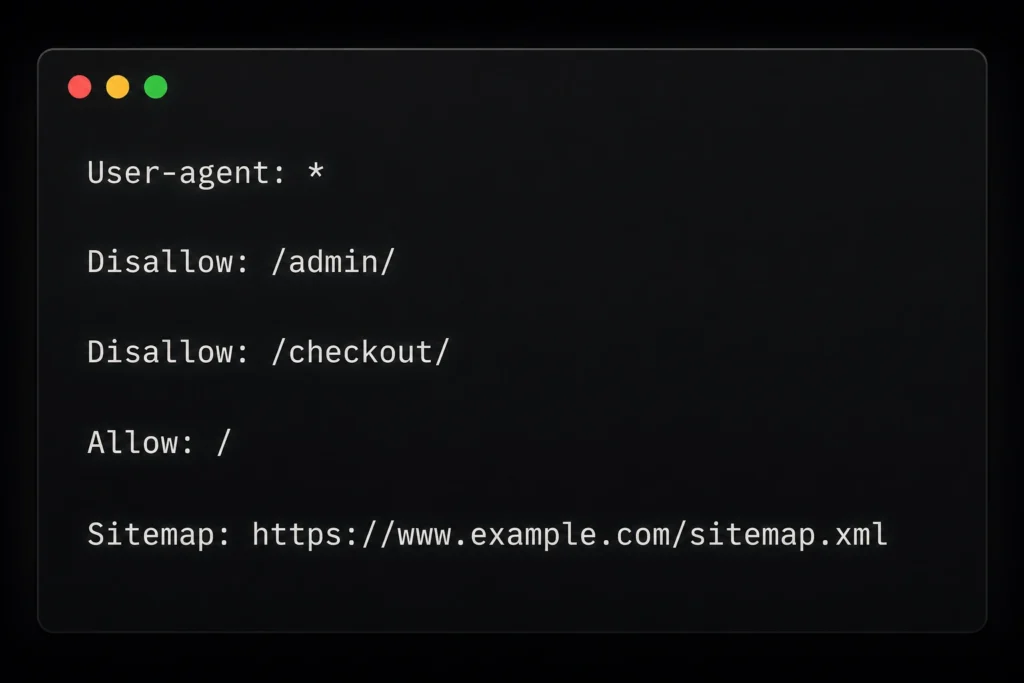
Robots.txt can reduce crawl waste on large sites. Common candidates include internal search pages, faceted navigation, login areas, and endless parameter URLs. However, blocking CSS, JavaScript, product filters, or required APIs may stop Google from rendering pages correctly.
What Is XML Sitemap and how XML Sitemap Works

An XML sitemap is a machine-readable file that lists important URLs and may state when each page received a meaningful update.
Search engines use it as a discovery source. It is useful for new sites, ecommerce stores, news sites, multilingual platforms, and pages with few internal links. Google’s sitemap documentation sets a limit of 50,000 URLs or 50 MB uncompressed per sitemap. Larger sites need a sitemap index.
When understanding what is XML Sitemap, remember that it should include only live, canonical, and indexable URLs. Exclude redirects, 404 pages, duplicate parameters, noindex pages, blocked URLs, and staging content.
Use lastmod only for meaningful updates. Google ignores priority and changefreq, so artificial values do not improve rankings. Internal links still matter because an XML sitemap does not replace proper website navigation.
How Robots.txt and Sitemap.xml work together
Robots.txt and Sitemap.xml work best when one limits unnecessary crawling and the other presents a clean inventory of pages worth discovering.
Use this workflow:
- Decide which pages should appear in search.
- Keep those URLs crawlable, canonical, internally linked, and in the sitemap.
- Remove duplicate or low-value URLs from the sitemap.
- Block crawl traps only when a real crawl problem exists.
- Add the complete sitemap URL to robots.txt.
- Submit it through Google Search Console.
Check both files after migrations, redesigns, domain changes, plugin updates, or large content uploads. Run an SEO audit after major releases because deployments can silently change crawler rules.
How to Create, Submit, and Test the Files

Create both files through your CMS or server, verify their public URLs, and test whether search engines receive the instructions you intended.
WordPress, Shopify, Wix, and many other platforms generate sitemaps automatically, although editing options vary. Custom websites should generate sitemaps dynamically so additions and removals stay in sync.
Before submission:
- Open /robots.txt and confirm it returns plain text.
- Open the sitemap and check that it loads without errors.
- Use the preferred HTTPS and hostname version.
- Confirm important pages are not disallowed.
- Check sitemap URLs return 200 and use correct canonicals.
- Submit the file under Indexing > Sitemaps.
- Review Google’s robots.txt report for fetch errors.
Google’s report shows when robots.txt was last fetched and highlights processing errors or warnings.
Digirank’s guide to the best SEO tools covers useful crawlers and validators. Test product, service, blog, image, and parameter URLs before publishing changes.
Common Robots.txt and Sitemap.xml Mistakes
Most technical failures come from broad blocking rules, stale sitemap URLs, conflicting indexing signals, or treating public crawler instructions as a security system.
Common mistakes include:
- Leaving Disallow: / on a live website.
- Blocking a page that also has noindex, preventing Google from reading the tag.
- Listing redirects, duplicates, or non-canonical URLs.
- Blocking CSS or JavaScript needed for rendering.
- Using a relative sitemap address instead of a complete URL.
- Leaving staging URLs in the production sitemap.
- Assuming sitemap submission guarantees indexing.
When a page is missing from Google, inspect it before changing robots.txt. The cause may be thin content, duplication, a canonical mismatch, server errors, poor internal links, or noindex.
Digirank’s Take: Treat These Files Like Infrastructure
A reliable setup stays simple, documented, automatically updated, and checked after every major release instead of becoming a forgotten one-time SEO task.
At Digirank, we treat robots.txt and Sitemap.xml as production configuration. An engineer would not ship firmware without validation; crawler rules deserve the same discipline. One careless wildcard can restrict a product category.
Give ownership to a developer or SEO lead. Record why each rule exists, monitor Search Console, and compare sitemap URLs with canonical indexable pages. Pair this work with valid schema markup so search engines can access and understand the content.
Why These Files Matter for SEO and AI Search
Search and answer engines need accessible, organised source pages, but neither file can repair thin content, weak authority, or poor technical quality.
Robots.txt and Sitemap.xml support discovery, not relevance or trust. Pages still need clear answers, useful headings, evidence, internal links, helpful media, and a strong user experience.
For Indian startups, the main benefit is control. These files reduce crawl clutter, clarify indexing problems, and maintain a cleaner set of valuable URLs for Google and answer engines.
Conclusion
A well-planned robots txt and Sitemap.xml setup helps search engines crawl the right pages and discover important URLs faster. Understanding how XML Sitemap works also makes it easier to spot indexing gaps, remove low-value URLs, and keep your website technically healthy. For expert support with crawling, indexing, and long-term organic growth, explore Digirank’s SEO services in Bangalore.
FAQs About Robots.txt and XML Sitemap
These common questions explain robots.txt and XML sitemap setup in direct, voice-search-friendly language for website owners, marketers, and startup teams.
1. Do I need both robots.txt and Sitemap.xml?
Most websites benefit from both. Robots.txt controls crawler access, while Sitemap.xml helps search engines discover important canonical pages.
2. Should I add the XML sitemap to robots.txt?
Yes. Add the complete sitemap URL to robots.txt and submit it separately in Google Search Console for reporting and error checks.
3. Can robots.txt stop a page from appearing on Google?
Not reliably. It blocks crawling, not indexing. Use a crawlable noindex tag, an X-Robots-Tag header, authentication, or password protection.
4. Does an XML sitemap improve rankings?
Not directly. It helps discovery and recrawling, but the page still needs quality, relevance, internal links, and technical accessibility.
5. What pages should be excluded from a sitemap?
Exclude redirects, 404 pages, duplicates, parameter URLs, noindex pages, blocked URLs, staging content, and non-canonical versions.
6. How often should I update Sitemap.xml?
Update it when important URLs are added, removed, or significantly changed. A dynamic CMS sitemap should update automatically.
7. Where should both files be placed?
Robots.txt must sit at the root of each host. A sitemap may use another public path, but reference it with a complete URL.
8. Why are sitemap pages not indexed?
Google may skip them because of low value, duplication, canonical conflicts, noindex, crawl blocks, server errors, or weak internal linking.